AI Coach Pro User Guide
Table of Contents
Overview
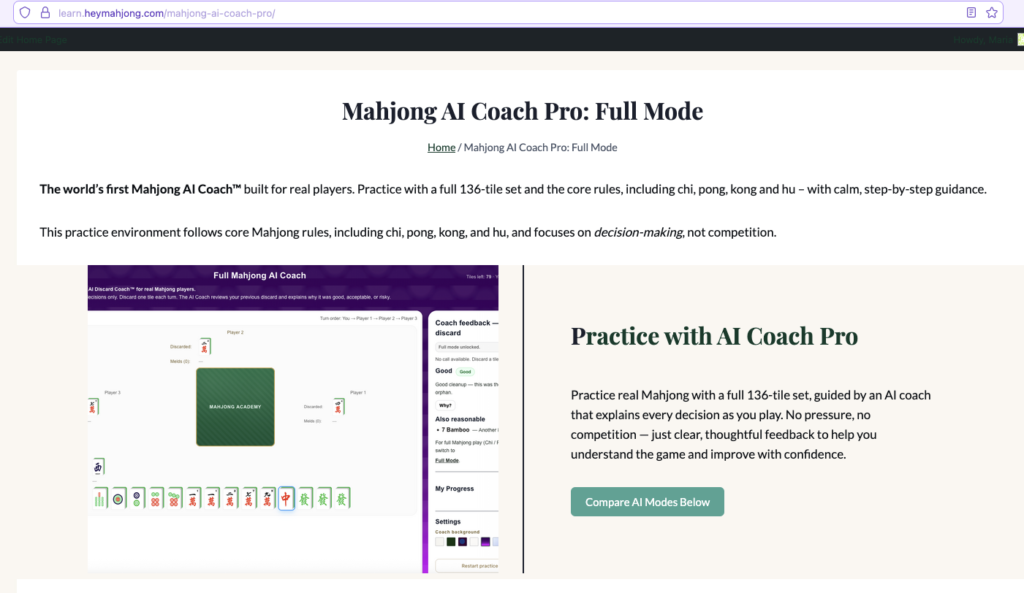
AI Coach Pro is the solo practice experience within AI Companion™. It allows you to play complete Mahjong hands against AI opponents while receiving real-time coaching on your discard and call decisions.
Unlike traditional Mahjong apps that simply let you play, AI Coach Pro evaluates your decisions as you play. After each discard or call, AI Companion™ explains whether your decision was Good, Acceptable, or Risky, helping you understand the reasoning behind stronger Mahjong strategy.
AI Coach Pro helps you:
- Choose stronger tiles to discard.
- Understand why a discard was good, acceptable, or risky.
- Respond correctly to Chi, Pong, Kong, Hu, and Pass opportunities.
- Build more efficient hands.
- Recognize common Mahjong patterns.
- Develop stronger decision-making habits over time.
You always play as Seat 1 (You), while the remaining three seats are controlled by AI opponents. Because the AI is always available, you can practice anytime without waiting for other players.
Whether you’re learning Mahjong for the first time or refining your strategy between games, AI Coach Pro helps you build confidence through repeated practice and immediate feedback.
Before You Start
Before using AI Coach Pro, make sure you have:
- A HeyMahjong account.
- Access to AI Companion™.
- A stable internet connection.
- A desktop, laptop, or tablet for the best experience. Mobile devices are supported, but a larger screen is recommended for easier gameplay.
AI Coach Pro is available to both free and paid users.
Free users can currently play one full practice session per day.
Unlimited access is available through:
- AI Companion™ subscription
- Core Membership
- Mahjong Master Membership (while the current promotion lasts)
If you have received an Unlock Code, you can enter it within AI Coach Pro to unlock additional access.
Before You Begin
Before starting your first practice session, take a few moments to understand the purpose of AI Coach Pro.
Unlike a traditional Mahjong game, AI Coach Pro is designed as a learning tool. The goal isn’t simply to win the hand—it’s to help you understand why certain decisions are stronger than others. Don’t worry if you make mistakes. The coaching feedback after each decision is one of the fastest ways to improve your Mahjong skills.
Starting Your First Practice Session
Step 1. Open AI Coach Pro
Sign in to your HeyMahjong account and open AI Companion™.
Select AI Coach Pro to begin a solo practice session.
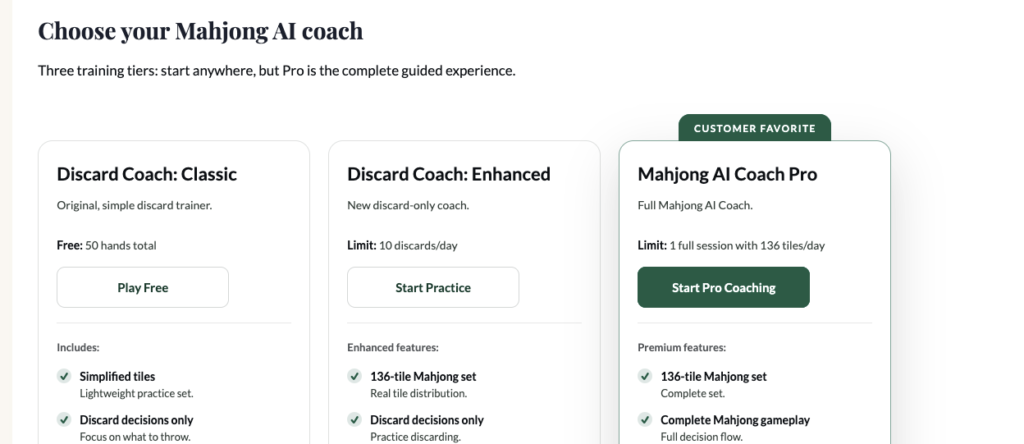
Step 2. Start a Practice Session
Select the Start Pro Coaching button.
AI Coach Pro automatically creates a new practice session and prepares the game.
Please wait a few moments while the practice table loads.
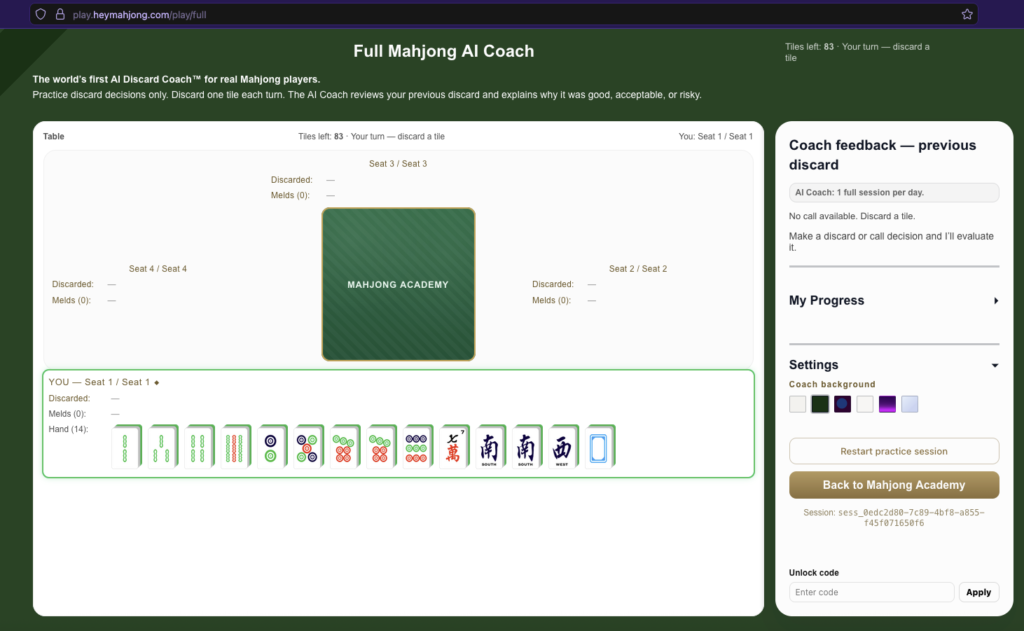
Step 3. Join the Practice Table
Once the game loads:
- Your Mahjong hand is dealt automatically.
- You are seated as You / Seat 1.
- The remaining three seats are automatically filled with AI opponents.
- No additional players are required.
You are now ready to begin practicing.
Understanding the Interface
AI Coach Pro is divided into two main areas:
- The Mahjong Table
- The Coaching Panel
Understanding these areas will help you navigate the game more easily.
The Mahjong Table
The Mahjong Table is where the game is played.
It displays the following information:
- Table – The main playing area where all four players participate.
- Tiles Left – The number of tiles remaining in the wall.
- Discarded – Tiles that each player has discarded during the current hand.
- Melds – Claimed tile sets, including Chi, Pong, and Kong.
- Hand – Your current Mahjong tiles.
Your hand always appears at the bottom of the table.
As the game progresses, you’ll draw tiles, discard tiles, and watch the AI opponents take their turns.
The Coaching Panel
The Coaching Panel appears on the right side of the screen.
It provides learning tools and account information throughout your practice session.
The panel includes:
- Coach Feedback – Reviews your previous discard or call decision.
- My Progress – Displays your learning progress and training statistics.
- Settings – Lets you customize your experience and restart your practice session.
- Unlock Code – Allows you to enter an unlock code for additional access.
You’ll use the Coaching Panel throughout every practice session to review feedback, track your progress, and access additional features.
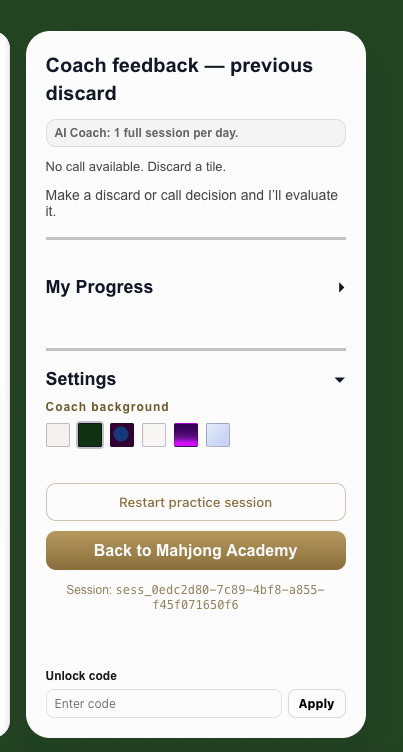
Screenshot above: AI Coach Pro Coaching Panel showing Coach Feedback, My Progress, Settings, and Unlock Code.
Playing a Hand
When it is your turn, AI Coach Pro displays the message:
Your turn — discard a tile
This indicates that you need to choose one tile from your hand to discard.
To play your turn:
- Review your current hand.
- Decide which tile you want to discard.
- Select the tile.
- Your discarded tile will be placed on the table.
- AI Coach Pro automatically continues the game and the AI opponents will take their turns.
If it is not your turn, simply wait for the AI opponents to complete their actions. The game will automatically return to your turn when appropriate.
Responding to Calls
Sometimes another player discards a tile that you can claim.
When this happens, AI Coach Pro displays a prompt similar to:
Call available — choose CHI, PONG, KONG, HU, or PASS.
Depending on the situation, you may see one or more of the following action buttons.
CHI
Claim the discarded tile to complete a sequence of three consecutive tiles.
PONG
Claim the discarded tile to complete three matching tiles.
KONG
Claim the discarded tile to complete four matching tiles.
HU
Claim the discarded tile to complete your winning hand.
PASS
Choose not to claim the discarded tile and allow play to continue.
To respond to a call:
- Review the available action buttons.
- Decide whether claiming the tile improves your hand.
- Select the action you want.
- If you do not want to claim the tile, select PASS.
Once your selection is made, the game automatically continues.
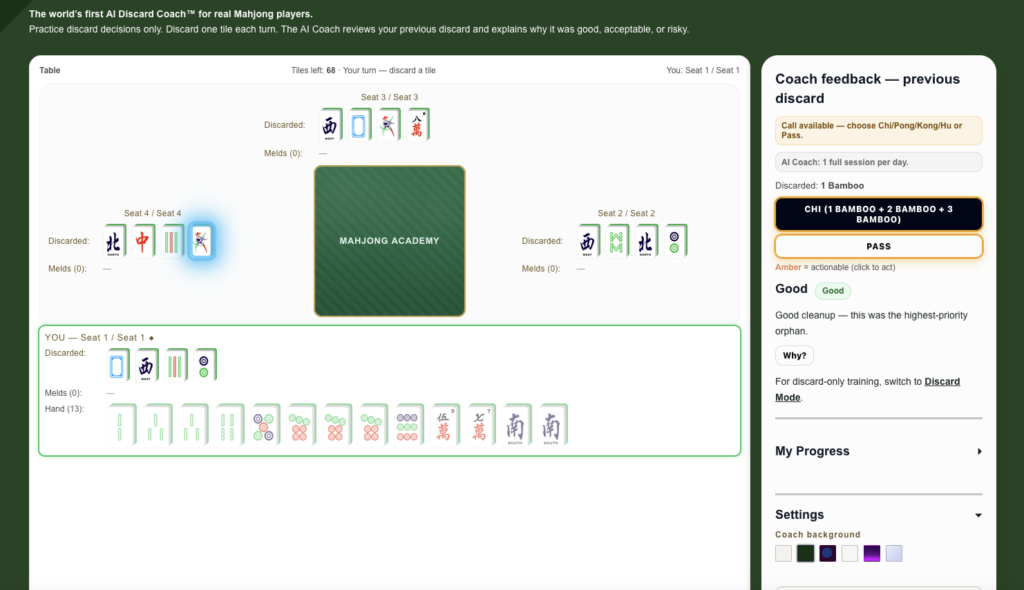
Screenshot above: call available prompt showing the CHI, and PASS buttons.
AI Discard Guidance
One of the most valuable features of AI Coach Pro is its real-time coaching.
After each discard or call decision, AI Companion™ analyzes your move and updates the Coach Feedback panel.
Your decision may receive one of the following ratings:
- Good
- Acceptable
- Risky
Each rating includes an explanation to help you understand why the decision strengthened or weakened your hand.
When available, select Why? to view a more detailed explanation of the recommendation.
AI Companion™ may also suggest cleaner or equally effective discard options that could improve your hand.
The purpose of AI Coach Pro is not simply to tell you which tile to discard. Instead, it helps you understand the strategy behind each decision so you can become a stronger Mahjong player over time.
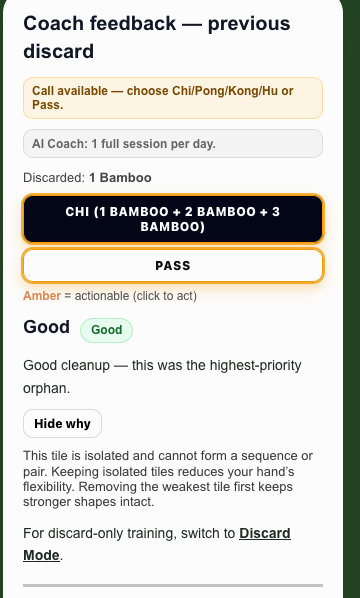
Coach Feedback panel showing a Good, Acceptable, or Risky evaluation with the Why? button.
Daily Free Usage Limits
AI Coach Pro is available to both free and paid users.
Free accounts currently include one full practice session per day.
If you have already used your daily practice session, AI Companion™ displays a message indicating that your daily limit has been reached.
When this happens, you have several options:
- Wait until your daily session resets.
- Enter an Unlock Code if one has been provided to you.
- Upgrade to an AI Companion™ subscription or an eligible membership for unlimited access.
Unlimited Access
Unlimited access is available through:
- AI Companion™ subscription
- Core Membership
- Mahjong Master Membership (while the current promotion lasts)
If you have received an Unlock Code:
- Open the Unlock Code section in the Coaching Panel.
- Enter your code in the Enter Code field.
- Select Apply.
If the code is valid, AI Companion™ immediately unlocks the additional access associated with your code.
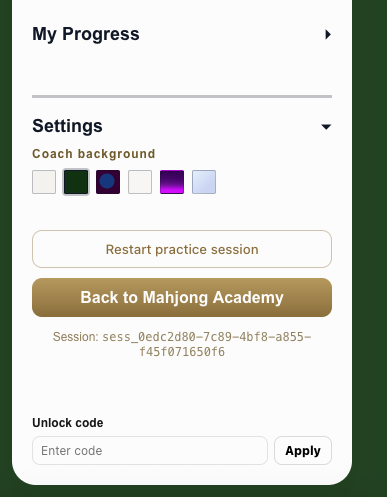
Unlock Code section showing the Enter Code field and Apply button.
Practice Summary
When a practice hand ends, AI Coach Pro displays a Practice Summary to help you review your performance and identify areas for improvement.
The Practice Summary may include:
- Decision Quality
- Number of Good decisions
- Number of Acceptable decisions
- Number of Risky decisions
- Top clean discards
- Suggested next focus
- Coaching recommendations that encourage continued practice
Take a few moments to review your results before starting another session. Understanding why a decision was rated Good, Acceptable, or Risky will help you improve more quickly over time.
Starting Another Practice Session
When you’re ready to continue practicing, you can immediately begin another hand.
From the Practice Summary page, select:
- Play Another Practice
You can also restart your current practice session at any time.
To restart a practice session:
- Open Settings.
- Select Restart Practice Session.
This starts a new practice hand so you can continue improving without leaving AI Coach Pro.
Tips
Getting better at Mahjong takes practice. AI Coach Pro is designed to help you learn through repetition and feedback.
Keep these tips in mind while practicing:
- Take your time before every discard. Don’t rush your decision.
- Look for isolated tiles that do not connect well with the rest of your hand.
- Compare your decision with the AI Coach’s recommendation after every discard.
- Select Why? whenever it is available to understand the reasoning behind the AI’s evaluation.
- Review My Progress regularly to monitor your improvement over multiple practice sessions.
- If you’re unsure whether to claim a discarded tile, compare the available CHI, PONG, KONG, HU, and PASS options with your current hand before making a decision.
- Review your Practice Summary after every hand to identify patterns and opportunities for improvement.
- Remember that making mistakes is part of the learning process. Every hand is another opportunity to improve your Mahjong skills.
Troubleshooting
I can’t start a practice session.
Make sure you are signed in to your HeyMahjong account and have an active internet connection.
If the problem continues, refresh your browser and try again.
I don’t see the practice table.
Wait a few moments for the table to load.
If the table does not appear, refresh your browser and restart AI Coach Pro.
I can’t discard a tile.
You can only discard when the game displays:
Your turn — discard a tile
If another player is taking a turn, wait for play to return to you.
I see a call prompt and can’t discard.
When a call opportunity is available, you must respond before the game continues.
Select one of the available actions:
- CHI
- PONG
- KONG
- HU
- PASS
After making your selection, the game will continue automatically.
I’ve reached my daily free limit.
Free accounts currently include one full practice session per day.
If you’ve reached your daily limit, you can:
- Wait until your daily session resets.
- Enter an Unlock Code if you have one.
- Upgrade to an AI Companion™ subscription, Core or Master membership for unlimited access.
My Unlock Code doesn’t work.
Verify that you entered the code exactly as it was provided.
If the code is still not accepted, please contact HeyMahjong Support for assistance.
Frequently Asked Questions
Do I need other players to use AI Coach Pro?
No. AI Coach Pro is a solo practice experience. The remaining three seats are automatically controlled by AI opponents, allowing you to practice anytime.
Is AI Coach Pro suitable for beginners?
Yes. AI Coach Pro is designed for players of all experience levels, from complete beginners to experienced Mahjong players.
What do the Good, Acceptable, and Risky ratings mean?
These ratings evaluate the quality of your decisions.
- Good – A strong strategic decision that supports your hand.
- Acceptable – A reasonable decision with little downside.
- Risky – A decision that may weaken your hand or miss a stronger opportunity.
These ratings are designed to help you understand Mahjong strategy, not simply whether a move was right or wrong.
What does PASS mean?
PASS means you choose not to claim another player’s discarded tile. Play continues normally with the next player’s turn.
Can I customize AI Coach Pro?
Yes. Open Settings to customize your experience, including changing the Coach background and restarting your practice session.
Where can I see my progress?
Open My Progress from the Coaching Panel to view your training statistics, including your Average Decision Quality, Hands Completed, Current Focus, and Training Streak.
Need More Help?
If you need additional assistance, visit the AI Companion™ section of the Help Center or contact HeyMahjong Support.